
CUBITT 5 MANUAL
Thank you for choosing Fyne Audio loudspeakers, proudly designed by our experienced team of engineers in Scotland, and constructed to the highest standards. We believe they will give you many years of listening pleasure.
Check that the following accessories are present:
•Self-adhesive feet x 8
•Power cable(s) appropriate to region
•Remote control
•Remote control batteries (AAA type x 2)
•Primary to secondary unit loudspeaker cable (3m)*
*A longer 8m cable is available as an accessory- please contact your dealer
The performance of any loudspeaker is greatly influenced by the room placement. Corner or proximity to rear wall placement will increase the amount of bass, while moving the loudspeaker out into the room will give less bass. Be prepared to experiment with position for best results. The loudspeaker may be located on a bookshelf, desk, work surface or suitable stand.
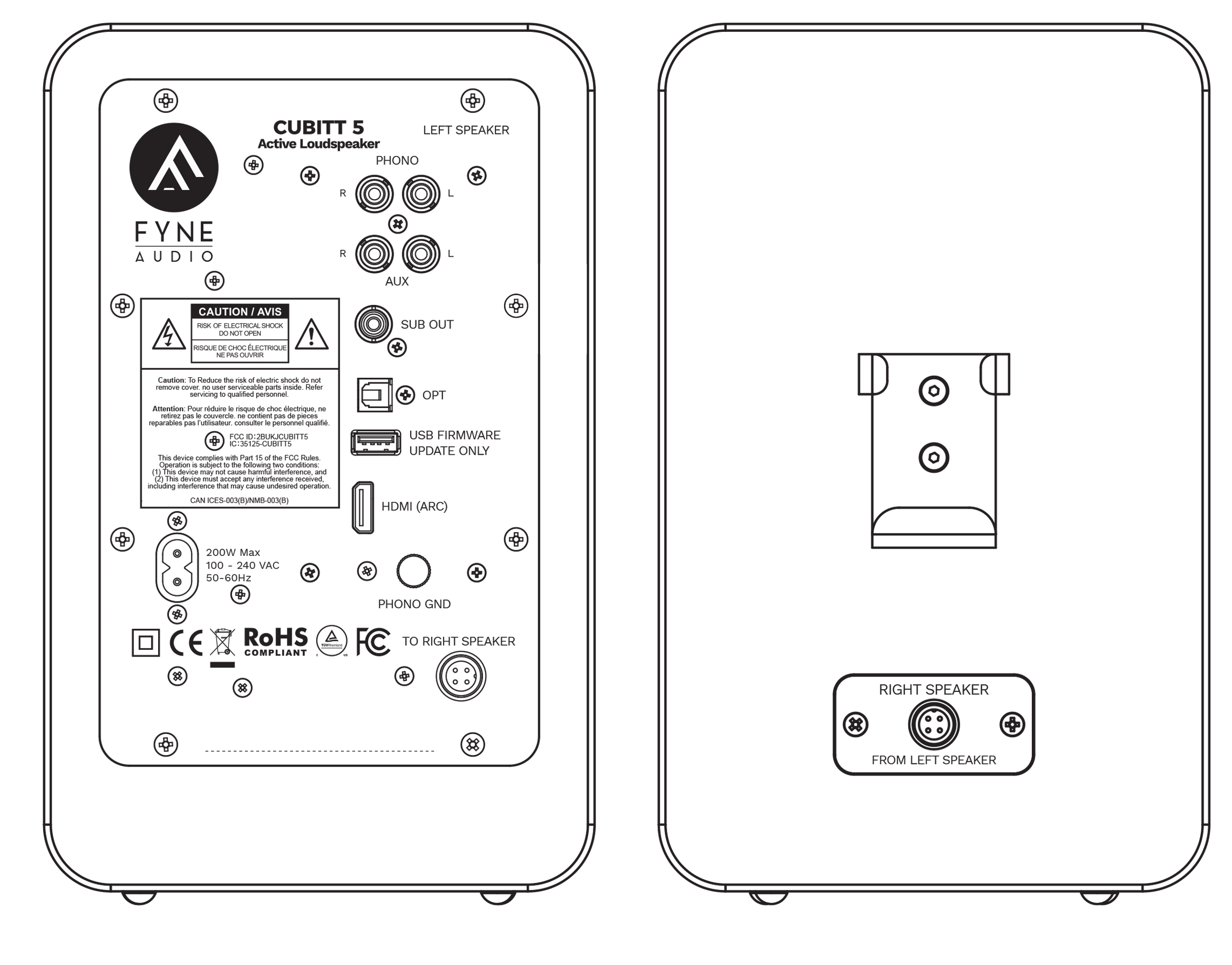
Always make and check all connections before plugging the loudspeaker into the mains.
PHONO INPUTS
Suitable for turntables with MM or high output MC cartridges.
PHONO GND
For turntable ground connection (where provided). Hum may result if not connected.
AUX
For line level analogue sources such as CD players and DAC’s.
SUB OUT
For connection to an external subwoofer. This is a mono signal, so may be connected to either L or R subwoofer input.
OPTICAL
Optical input for digital sources.
USB
This is for firmware updates only, from a memory stick.
HDMI (ARC)
For TV sound with HDMI ARC. NOTE: only 2.0 PCM sound is supported- ensure source is set appropriately. With some televisions, the eARC function will need to be disabled.
SPEAKER SOCKET
For connection to the RIGHT LOUDSPEAKER using the cable provided. NOTE: the connectors are latching, so ensure they are tightened when connected.
MAINS INLET
Universal voltage input, using the cable provided.
ON LEFT SPEAKER FRONT PANEL:
POWER INDICATOR LIGHT
RED- standby
BLUE- shows response to remote control buttons. Will extinguish after approximately 5 seconds.
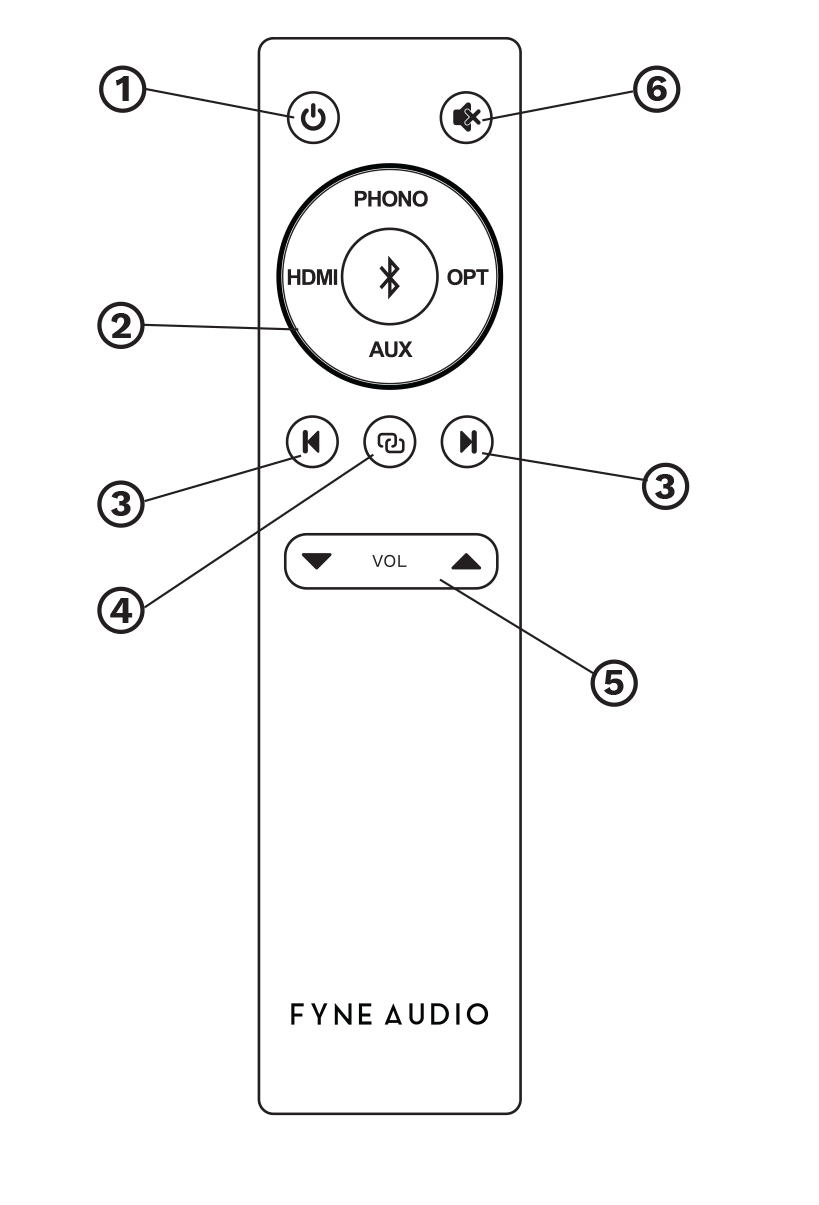
1 Power ON / OFF
2 Input selector
3 Bluetooth skip track backwards or forwards
4 Bluetooth pairing: press and hold to pair new device. The loudspeaker will be seen as FYNE AUDIO CUBITT 5 on your device.
5 Volume UP/ DOWN
6 Mute / unmute volume
BLUETOOTH DEVICES
For Bluetooth devices, ensure the loudspeaker is powered on, press and hold the PAIRING button on the remote for
around 3 seconds, until the LED starts flashing blue indicating it is in pairing mode. With Bluetooth activated on your
device, scan to find FYNE AUDIO CUBITT 5 and select PAIR. The LED will change to solid blue to indicate this has been
achieved.
Pressing and holding the PAIRING button will reset Bluetooth connections while this input is selected,
ADDITIONAL INPUTS
Use the remote control to select between additional inputs for PHONO, LINE LEVEL, OPTICAL and HDMI ARC.
FIRMWARE UPDATES
From time to time firmware updates will be available on the Fyne Audio website, to download onto a USB stick. This
should be formatted as FAT32 and correctly ejected from the computer after downloading.
Remove the loudspeaker power cable and insert USB stick. Replace power cable and LED will flash blue for a few
seconds, indicating update has taken place. You can then remove USB stick.
STANDBY FUNCTION
After approximately 20 minutes of inactivity, the loudspeaker will enter STANDBY MODE, in order to conserve power. It
will become activated again in the presence of an input signal. This will occur with any source except PHONO, where
the remote control POWER button will need to be selected.
REMOTE CONTROL STORAGE
The rear of the secondary loudspeaker is fitted with a holder for storing the remote control, to avoid it getting
Like all loudspeakers, being electro-mechanical devices, the Cubitt 5 Active Loudspeaker require a degree of running
in to reach optimum performance. We recommend simply listening to them at normal levels for around 40 hours to
achieve this.
Clean only with a soft dry cloth. The use of solvents or abrasive materials can cause damage, rendering the warranty
invalid.
All Fyne Audio products purchased from an authorised distributor or retailer are covered by a manufacturer’s warranty,
subject to presentation of a valid proof of purchase. This warranty is provided in addition to, and does not affect, your
statutory rights as a consumer under applicable national or local laws.
Full warranty terms and conditions are available at www.fyneaudio.com/warranty. Alternatively, you may request a copy
or obtain further assistance by contacting our Customer Service Department by telephone on +44 (0)141 428 4008
(charges may apply for calls made from outside the UK), by email at enquiries@fyneaudio.com, or by post at:
Fyne Audio Limited
No. 1 Cubitt Court
Belgrave Street
Bellshill
North Lanarkshire
ML4 3NP
United Kingdom
| Frequency response (-6dB typical in room) | 43Hz – 34kHz |
|---|---|
| Amplifier Power | Total maximum 240W, DSP active crossover |
| Configuration | Wired speaker level connection between Primary & Secondary |
| Drive unit complement | 5-inch IsoFlare with 19mm concentric titanium dome tweeter (time aligned point source) |
| Inputs | Bluetooth 5.0 aptX HD & AAC, HDMI ARC (2.0 PCM), Analogue RCA line, Phono (MM or high output MC), Optical (digital) |
| Outputs | Subwoofer |
| Resolution | 24 bit/ 96kHz (maximum) |
| Remote Control | IR |
| Standby Activation | 20 mins (in absence of signal) |
| Mains Voltage | 100- 240V (universal) |
| Power Consumption | 200W |
| Dimensions - HxWxD | Primary Unit: 260 x 165 x 215mm (10.2 x 6.5 x 8.5"), Secondary Unit: 260 x 165 x 223mm (10.2 x 6.5 x 8.8") |
| Net Weight - Each | Primary unit: 4.2kg (9.3lbs), Secondary Unit: 3.6kg (7.9lbs) |